


 Some of the links on this site may be affiliate links. ICOBench may receive advertising commissions when users visit recommended platforms via our affiliate links, at no additional cost to you. All recommendations are based on a comprehensive review process.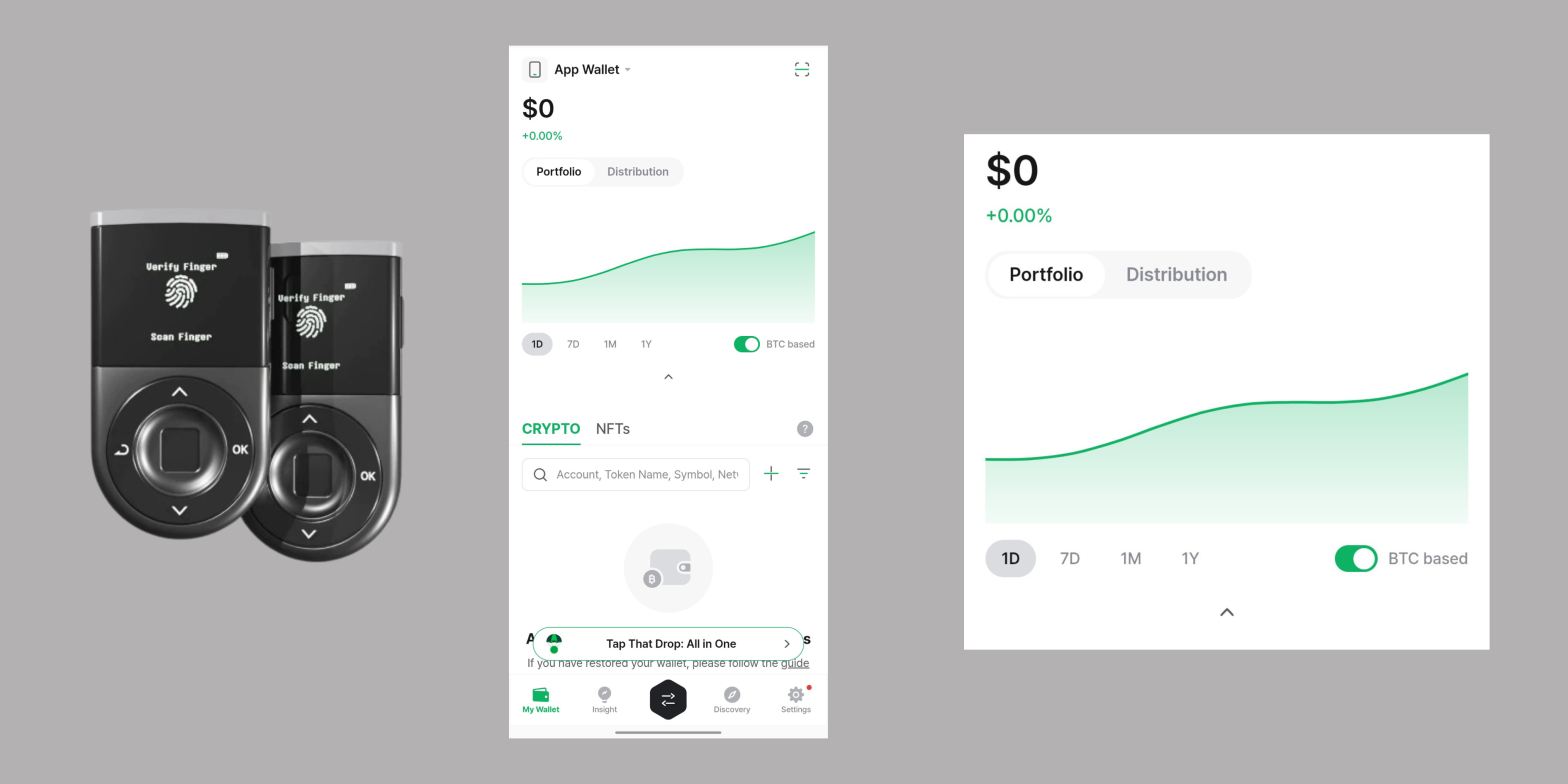
Viewing your entire D’CENT portfolio just got easier, as you can now view your asset performance right from the home screen. The new feature and layout make the entire process intuitive and more engaging, as you no longer have to dig deep into individual accounts to see your progress.
You’ll get even more intuitive controls with the new “portfolio” feature, from the timeframes to the underlying cryptocurrency. D’CENT has also added a few gesture controls to help you navigate the performance chart better and to effortlessly pinpoint specific price points.
The new update makes the D’CENT wallet smarter to operate. And it works for casual and seasoned investors.
A New Way to View and Manage Your Portfolio
D’CENT’s new portfolio isn’t showcasing what you haven’t seen before. But it is making them more accessible and effortless to manage, as you can now view them on the homepage.
The key things to expect in this new design and layout are as follows:
- Portfolio snapshot on the homepage
You can view your portfolio right from the moment you open your D’CENT wallet app. The feature is now integrated into the main dashboard, alongside the “Distribution” feature. And with it, you can check your total asset trend without going into individual accounts.
- Performance tracking
Besides checking your asset trend, D’CENT has also added a nifty feature that allows you to view how your total assets evolve. And even better, you can change which cryptocurrency to base your portfolio performance on. D’CENT allows you to switch between USD and BTC (Bitcoin), which makes the entire experience flexible. Simply toggle the switch to BTC and toggle it again to switch to USD. And you can drag your finger across to see the BTC value at any point.
Controls on Your Fingertips
The new portfolio feature requires new controls, and D’CENT didn’t disappoint on that. You’ll find the following controls to help you manage your assets better:
Timeframe Controls
You can change the timeframe for your asset performance. D’CENT has the following preset timeframes: 1D (1 day), 7D (7 days), 1M (1 month), and 1Y (1 year). Simply tap on anyone to see how your portfolio performed within that period. And note that your asset performance continues in real time.
If you want to see the values and percentage changes at each point, all you have to do is drag your fingers to that point. You’ll get clear and real-time insight at every touch.
Control to Hide Chart
D’CENT has also provided the option to hide the chart when you don’t need it. You can use it to keep your home screen minimal, and all you need is to bring back the chart is one touch.
Get More Privacy with the Asset Visibility Control
The option to hide or show your assets is available with one touch. Simply tap the asset section to hide or unhide it. While the feature was already available with the eye-toggle button, this new implementation makes the experience more seamless and engaging.
The D’CENT Wallet: The Future of Cryptocurrency Storage and Management
D’CENT offers a biometric hardware wallet with secure chip technology for extra security. You can also get the card wallet, which uses NFC connection for asset storage and management. But what makes the whole experience even better is the D’CENT wallet app, which adds a third, free hot wallet when you set it up.
With the wallet app, you can manage all your assets at a glance. And with the new portfolio feature, you can view your asset performance at any point in time. Note that the feature works for all your assets across the hardware and software wallets.