


 Some of the links on this site may be affiliate links. ICOBench may receive advertising commissions when users visit recommended platforms via our affiliate links, at no additional cost to you. All recommendations are based on a comprehensive review process.
 While AI continues to gain ground, the latest IBM reports tell a different story. The reports indicate that 13% of organizations have reported breaches of AI models and applications. What’s even more concerning is that 97 of those organizations report not having any AI access controls. These are the core reasons why we dug into the nexos.ai review to see if this new tool offers the access controls needed to prevent these breaches.
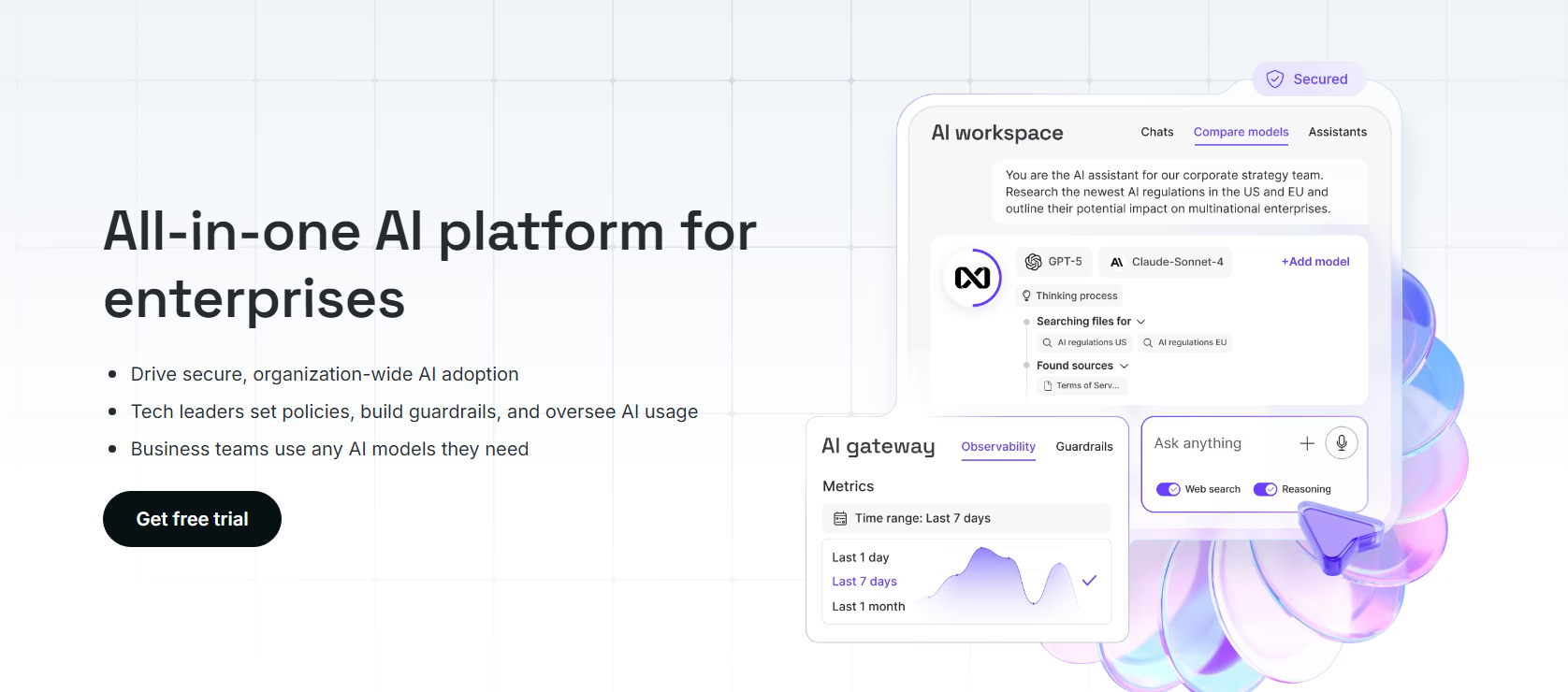
nexos.ai places all AI models in one place, offering better access control for employees. Instead of having your employees use their personal accounts and access different AI models, they can access the models via nexos.ai. This approach ensures regulated access and also facilitates the possibility for better collaboration.
This nexos.ai review will look at how efficient the platform is in providing regulated AI access to employees and developers. We will know that by looking at its key features and the market response to its debut.
nexos.ai is the creation of Lithuania-based Okmanas and Eimantas Sabaliauskas. The duo bootstrapped the unicorn, Nord Security, to become a global market leader in the sector for 12 years. Now, they launched nexos.ai in 2025, but they took a different approach instead of bootstrapping the company. Barely a year after its launch, nexos.ai has secured funding from notable angels led by Index Ventures, with participation from Dig Ventures and Creandum. Other angel investors in the company include Olivier Pomel (CEO of Datadog), Ilkka Paananen (CEO of Supercell), and Sebastian Siemiatkowski (CEO of Klarna). The company also closed a €30M Series A funding round, co-led by Evantic Capital, a debut fund from the former Sequoia Capital partner, Matt Miller. This substantial capital inflow is pivotal to the company’s expansion, as you’ll see in this nexos.ai review.
nexos.ai’s CEO and co-founder, Tomas Okmanas, made a startling remark concerning cybersecurity. In his words, “While security teams focus on traditional cyber threats like ransomware, their own employees are carrying out the biggest data leak in corporate history right under their noses.” Of course, he was referring to the uncontrolled use of AI models in the workplace. The National Cyber Security Center also highlighted that organizations that cannot defend themselves against AI-enabled threats have greater cyber risk. Think of a typical organization of today. The marketing department might be using ChatGPT while the research and development department uses Claude. Even more concerning, the staff could be accessing these AI models with their personal accounts, leaving little to no room for oversight and control. Also, we have the risk of divulging sensitive company information to these AI models. nexos.ai solves that problem by combining an AI workspace interface and an AI gateway. The interface is for the employees, while the gateway is for developers. Together, they provide a unified layer for over 200 AI models. As such, organizations and companies can effortlessly route tasks to models that suit them best while maintaining centralized oversight, security, and cost management. Even with all these, your organization’s leadership will be able to control company-wide AI adoption with comprehensive guardrails and controls. The following are the pros and cons of this enterprise solution: ✅ The platform can route requests to the most efficient and available AI model if one model experiences downtime ✅ Company leadership can enforce AI-use policies and protect sensitive data by filtering them out ✅ nexos.ai logs all usage data for easy compliance review and monitoring ✅ Employees, developers, and management can use the best approach when accessing the AI models, thanks to the AI workspace and AI gateway features ✅ There is a free trial for new users ✅ You can see the cost from each team and also set budget controls for your teams ✅ Your teams can compare the models efficiently ✅ You can work with any file format and collaborate with other team members on AI Projects ✅ The platform has built-in web search capabilities that prevent data leaks through detailed trace visibility and detailed logging ✅ If your team works with sensitive data, you can easily use the private model hosting options ❌ nexos.ai is relatively new, and there isn’t a long-standing proven track record of delivery During our nexos.ai review, we explored the following core products: With nexos.ai, you can set up access to models for employees and your teams. For example, the creative teams could get access to NLP models that help with text generation and brainstorming. Other teams, like the tech teams, can then access coding-based LLMs. The granular permissions that nexos.ai allows can help you During our nexos.ai review, we discovered that the tool also allows you to set budget controls via token limits. This feature is especially important to prevent overspending. Even better, you simply pay one subscription to access the leading LLMs in one AI workspace, which, by the way, are in their thousands, with China releasing over 1,500 models, according to recent news reports. To ensure your team stays compliant, nexos.ai will allow you to do the following: Just as crypto wallets help manage all your assets in one spot, the AI workspace helps you access all the leading LLMs in one chat interface. The benefits of this feature are as follows: Some of the models available on the workspace include OpenAI, Google, Anthropic, and Meta. All these will be at arm’s length with a simple feature that allows your team to switch to any one at any time. Even while being tailored to teamwork, the workspace still includes log spans. This feature allows you to monitor AI usage across your workforce. You can track every query, the output from the model, and the subsequent interactions. Instead of using the typical browsers for your web search, you can use the one inside the AI workspace. This built-in web search function provides a secure browsing experience. That is because you can safely browse the web and retrieve information while adhering to your organization’s guardrails and policies. In addition to secure browsing, we also found secure storage during our nexos.ai review. With this feature, you can store replies and AI-generated files and access them subsequently from one location. The data leak prevention, easy integration of AI models, simplified auditing, and tailored access give nexos.ai an edge over most competitors. If you are into software development, the AI Gateway is one tool you should consider. In our nexos.ai review, this tool served more or less as a traffic router, but with advanced features. You can connect multiple LLMs through one secure endpoint, control costs, optimize your AI traffic, and manage access and usage. All you have to do to use this tool is to connect your company to nexos.ai via the API or web platform. With that done, you can apply customizable input and output filtration protocols. These will remove unwanted content, identify policy violations, and prevent prompt-based data leaks. BetaNews’ latest report indicates that one in 44 GenAI prompts risks a data leak. That makes nexos.ai Gateway all the more important to secure sensitive data in your organization. The logs and traces can help you gain full access to prompts, responses, and usage patterns. The AI Gateway allows you to monitor cost and spending from the leadership perspective. You can also set spending budgets for your team by setting token limits. We recommend this approach if you want to keep AI adoption financially sustainable in your organization. Smart LLM routing is also available in the AI Gateway. This feature automatically selects the best AI model based on the prompt. It ensures you get high-quality results from every prompt. We understand that as an organization, you’ll have to deal with multiple prompts all the time. What if you won’t have to enter new prompts every time? We were impressed during our nexos.ai review, as the platform has thought of that. The prompt library is a feature that allows you to organize your reusable prompts. You can turn them into templates and even add versions to identify and separate current templates from older ones.
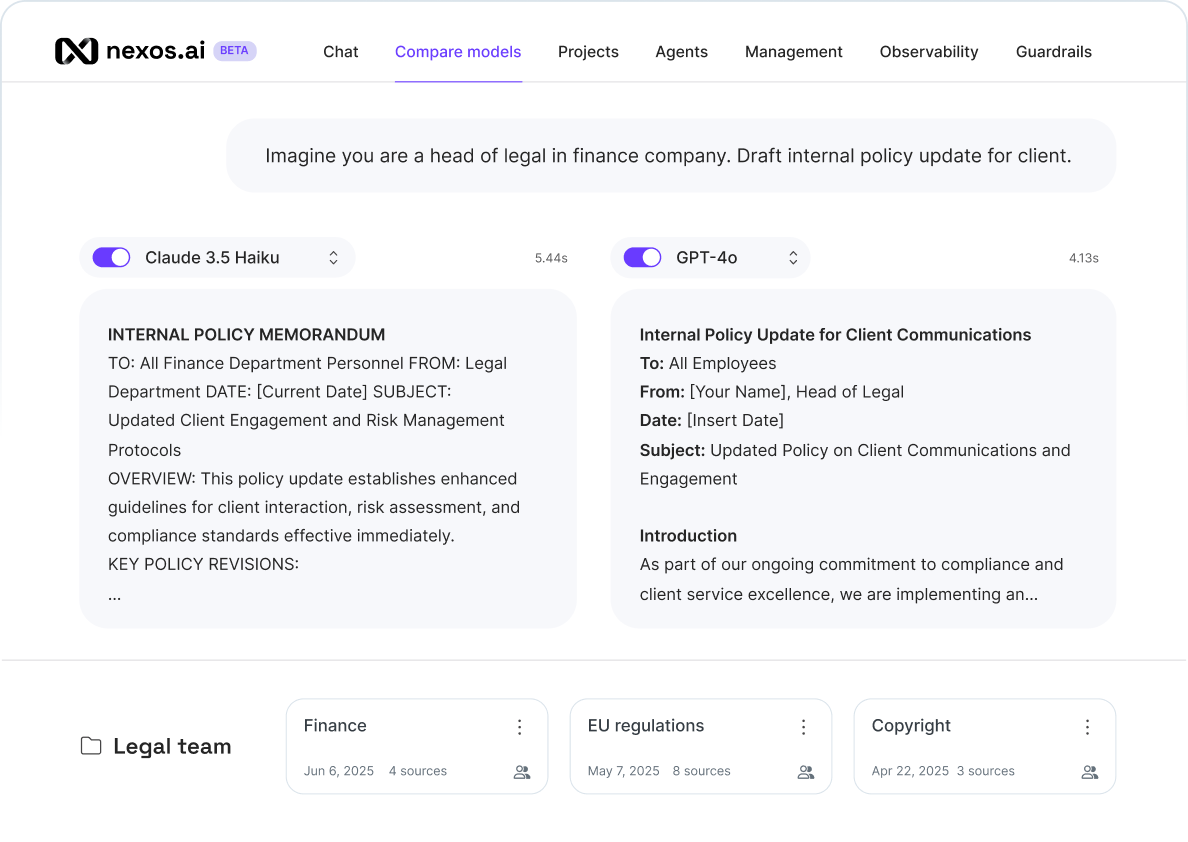
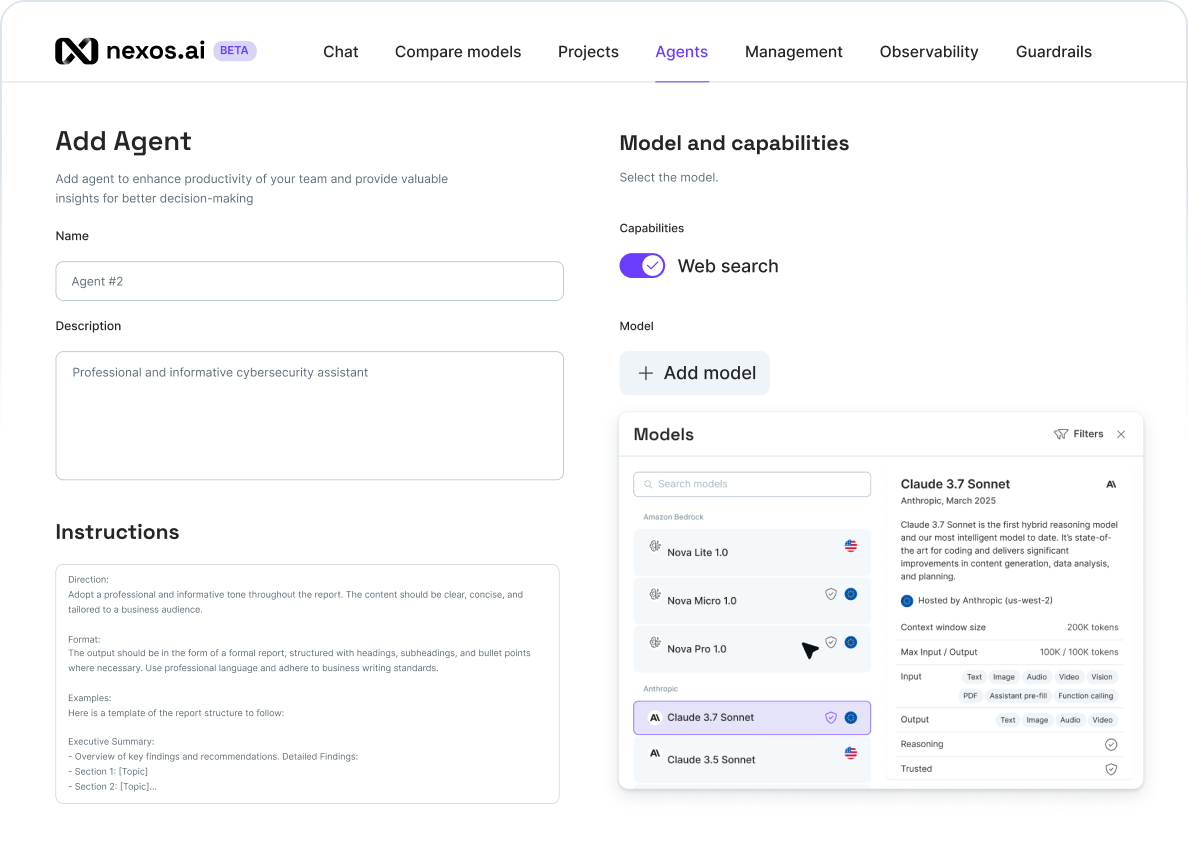
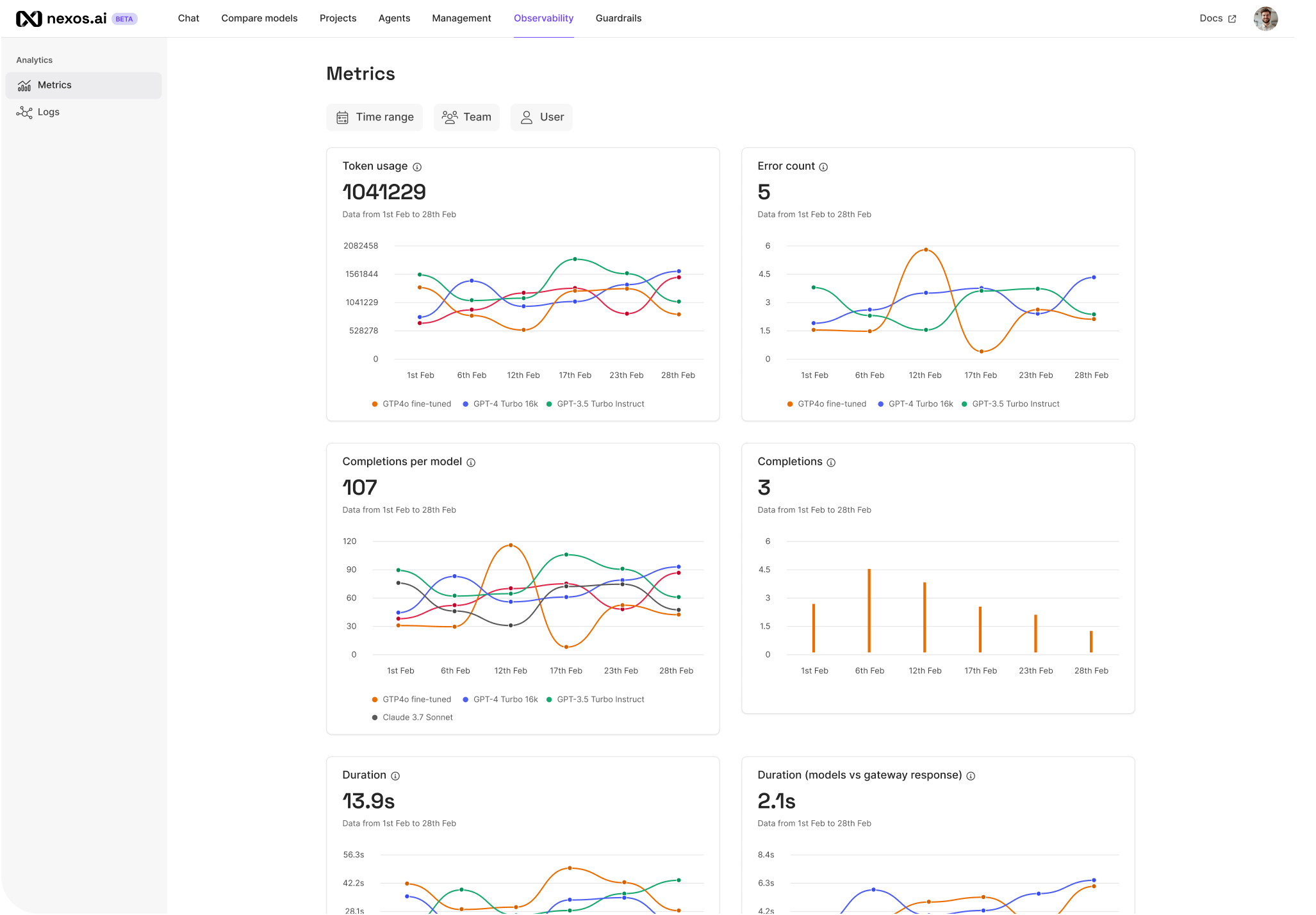
The core features we found during our nexos.ai review include the following: This feature supports multiple AI models and comes with enterprise-grade security. With nexos.ai, your employees will have instant access to AI-powered chats. What makes it even better is that you can create custom use cases for your teams. For example, you can create one use case to analyze data and another one to write emails. The chat feature also allows you to run isolated LLM instances. We recommend this approach if you have high-security or compliance-sensitive tasks. The self-hosted models are hosted privately with full access control. You can also add a web search to your chat. This addition provides deeper and more comprehensive insights into queries. Even better, we discovered during our nexos.ai review that the platform will provide sources for the information retrieved. With that, you can double-check the search results before working with the data. The nexos.ai chat feature is a must-have and, in many ways, the core of the platform. With it, you can carry out other functions, whether it is reviewing content or generating reviews. nexos.ai not only integrates different AI models. It also allows you to test them independently. And left for us, we recommend you compare the AI models to find the one that best suits your organization. The way to compare the models is simple. All you have to do is pick two or more models and run the same prompt. Then, compare the outputs and pick the best prompt for the task. And the things you should look out for during the comparison are the tone, speed, and output. This function is crucial if you have multiple teams in your organization. You could find the best model for marketing emails and the best model for coding. Then, allocate these models to your teams, instead of having your entire workforce use one AI model. I’m sure you know that current AI models keep a chat history. This way, you can continue conversations in context and ask the AI model to use information previously mentioned. Well, nexos.ai takes that a notch higher with projects. Instead of having a chat history with one user, you could have a history of every user in the project. The shared workspace stores information, from uploads to web searches, conversations, and custom introductions. Even better, you can have the shared workspace on any AI model. There is no need for complex setups. Your team can effortlessly upload files and reuse knowledge across tasks. What matters most is that the context is maintained across your team members. The nexos.ai project is a commendable feature for marketing teams, engineering departments, customer support, legal teams, and sales departments. With the dashboard, you can see the list of active projects, together with their files and chat history. As such, you can pick up where you left off or where another team member ended. Another impressive aspect we found during our nexos.ai review is the AI assistant feature. With it, you can create AI assistants, define your rules, feed the data, and adjust the tone and logic you need. The AI assistants can be crucial for automating repetitive tasks to cut costs and time. You can also use them to create custom use cases for your organization. For example, you can use the AI assistants to provide 24/7 customer support to your clients or allow HR to use the AI assistants for employee onboarding. With AI assistants, you’ll get the following benefits: Custom instructions allow you to define how each AI assistant behaves. That way, you can effortlessly manage multiple assistants. Each assistant maintains their own setup. As such, you don’t have to prompt reusable behavior again. Note that you can build your AI assistants using pre-built platforms. Alternatively, you can build them from scratch using LLMs on the nexos.ai platform. Whichever works for you, the platform provides a seamless interface to manage them all. The entire nexos.ai was built to primarily address security challenges that come with enterprise-wide AI adoption. Hence, as an admin, you can set guardrails for AI utilization within your organization. This approach allows you to prevent data leaks and filter inputs and outputs to ensure they align with or comply with the company’s policies. To configure guardrails, you simply head to the control panel and apply them in real time. In our nexos.ai review, we applied the guardrails to every interaction, from the browser-based AI workspace to the API integrations. Besides setting up the guardrails, you can also decide how they react when triggered. For example, you can set them to redact sensitive data once identified in a query. The guardrail could replace the sensitive data with placeholders or block the entire prompt to eliminate the risk of a data breach. The benefits of using guardrails in your organization cannot be overemphasized. First, you will have better compliance by blocking sensitive data from ever reaching third-party models. You can also run full audits on the blocked or flagged responses and help your compliance team understand the scope better. This function allows you to have complete oversight over how your organization uses the AI models in nexos.ai. It captures records of every LLM query from your workforce, including their responses, for in-depth analysis. And by tracking every prompt, response, and model interaction, you can better enforce accountability within your team. nexos.ai provides full LLM observability by doing the following:
nexos.ai provides a robust solution to manage enterprise-wide AI adoption. However, it is not a one-size-fits-all platform. I will recommend it if you belong to the following groups: If you or your organization belongs to the above-mentioned categories, nexos.ai will provide just the right tools you need to effect the necessary changes. The platform is well-suited for multi-talented teams and organizations with multiple departments. However, if you find yourself in the categories I am about to mention, nexos.ai might not provide much help. And the cost could be financially unsustainable for you. First, during our nexos.ai review, we had a 14-day free trial. The free trial does not require a credit card registration, which is commendable. And if you want to test the platform before committing your finances, the free trial is the best way to do it. Beyond the free trial, nexos.ai does not provide any public pricing information. Instead, it offers custom pricing that may be negotiable with the sales team. The pricing will also depend on which features you’ll use. Follow the steps below to sign up and get the free trial: From our nexos.ai review, I can recommend this platform to you if your enterprise is struggling with compliance and sensitive data in AI usage. If your teams use fragmented AI tools, the nexos.ai platform is one way to consolidate them for better control and monitoring. nexos.ai provides access to the leading AI models, but with the added benefit of better compliance. Even better, you can build AI assistants for your teams to increase speed and improve efficiency. Keep in mind that nexos.ai will require a significant financial commitment, which is why I won’t recommend it to small companies or teams of less than five people. It’s a tool that will work better in large enterprises with multiple departments.
Key Takeaways
nexos.ai — An Overview
What nexos.ai Does
Feature
Description
AI workspace
With the workspace, teams can chat with multiple LLMs, but all in one interface. The approach maintains security via customizable guardrails and role-based access controls.
AI Gateway
The AI Gateway, on the other hand, allows developers to access all models through one endpoint via the plug-and-play API. It also has intelligent caching that reduces costs and improves latency, including the retrieval-augmented generation (RAG), which grounds responses in company documents.
Pros and Cons of nexos.ai
Pros
Limitations
✅ Your team will be able to access hundreds of AI models with a single sign-in point
❌ The absence of public pricing information might be a limitation for small businesses
The Three Core Products of the nexos.ai Platform
AI Security and Governance

AI Workspace
AI Gateway
Core Features and Functions
✰ The Chat Feature
✰ Model Comparisons
✰ Projects
✰ Assistants
✰ Guardrails
✰ Observability
When You Should Pick nexos.ai and When You Should Consider Other Alternatives

The Pricing Model
How to Set Up nexos.ai
nexos.ai Review – Conclusion
FAQ
What do I need to start using nexos.ai?
Can I use nexos.ai for free?
Is nexos.ai worth it?
Do I need coding knowledge to use nexos.ai?
Can I set nexos.ai to flag sensitive data when used?